
Graphic Design
Step-by-Step Guide to Logo Design: From Idea to Final Delivery
WiseLand Studio · September 7, 2026
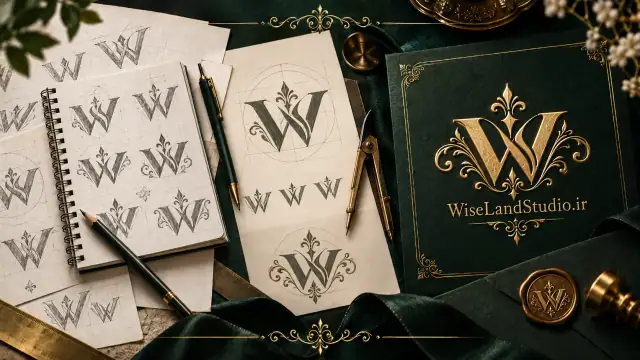
Step-by-Step Guide to Logo Design: From Idea to Final Delivery
Did you know your logo shapes a viewer's first impression in under 5 seconds? A professional logo is more than a simple image; it encapsulates your brand's identity, values, and personality into a single symbol. This guide provides a structured process to help you create a logo that is both memorable and functional.
Step 1: Research and Discovery
Before putting pen to paper, invest time in deeply understanding the brand. This phase is the bedrock of all subsequent steps.
- Understand the Brand: Interview the client or your team. What does the business do? What is its mission and vision? What are its strengths and differentiators?
- Analyze Competitors: Examine the logos of main competitors. What visual elements are common in your industry? How can you stand out and be unique? Avoid copying, but draw inspiration from understanding the landscape.
- Define the Target Audience: Who is this logo designed for? Understand the preferences, age, and expectations of your target group. A logo for a law firm differs fundamentally from one for a toy brand.
Step 2: Sketching and Ideation
Now it's time to translate mental ideas onto paper. This is often the most enjoyable and creative phase.
- Brainstorming: Write down keywords related to the brand. Jot down any symbols, concepts, and visual metaphors that come to mind.
- Hand Sketching: Use a pencil and paper. Don't worry about making beautiful drawings; the goal is to generate ideas. Create between 50 to 100 small, quick sketches. Quantity increases the chance of reaching a truly unique idea.
- Select the Best: From the mass of sketches, choose 3 to 5 concepts that show the most potential and redraw them with more care.
Step 3: Digitizing and Vectorization
In this step, you transfer the chosen ideas from paper to a digital environment.
- Use Vector Software: Utilize professional vector software like Adobe Illustrator (the most popular), CorelDRAW, or Affinity Designer. These programs are math-based, allowing for unlimited scaling without any loss of quality.
- Master the Pen Tool: The Pen Tool is your most critical instrument. Create smooth, precise curves by placing anchor points and adjusting Bezier handles.
- Importance of SVG Format: Always save the final version of your logo in SVG (Scalable Vector Graphics) format. This is the web standard and is ideal for websites, applications, and any digital display.
Step 4: Smart Color Selection
Colors evoke powerful emotions. Choosing the right palette reinforces your brand message.
- Understand Color Psychology:
- Blue: Trust, security, and professionalism (suitable for finance and tech).
- Red: Excitement, energy, and passion (suitable for food and sports brands).
- Green: Nature, health, and sustainability (suitable for organic and eco-friendly products).
- Yellow: Happiness, creativity, and warmth (suitable for children's and creative brands).
- Gold: Luxury, quality, and authenticity (as we believe at Wiseland Studio).
- Limit Your Palette: It's best to use a maximum of 3 primary colors in a logo. One or two-color logos are more versatile and often more timeless.
- Prepare Variations: Always have a full-color version, a black-and-white version, and a monochrome version of your logo ready for any background.
Step 5: Typography
If your logo includes text (the brand name), choosing the font is as crucial as the symbol.
- Harmony with the Symbol: Select a font that matches the personality of your graphic symbol. A classic serif font will clash with a modern, minimalist icon.
- Legibility is Key: This is the most important rule. Your chosen font must be easily readable at small sizes (e.g., on a business card). Avoid overly decorative fonts for your primary text.
- Standard Web Fonts: If the logo will be used on a website, consider fonts available in libraries like Google Fonts to ensure consistent display across all devices.
Step 6: Standard File Delivery
The final step is delivering a comprehensive package of files so the client has no concerns about usage.
- Master Vector Files (Editable): Deliver files in AI (native Illustrator) and EPS formats.
- Web-Ready Files: Provide outputs in SVG (the best choice), PNG with a transparent background (in various sizes like 500x500 and 2000x2000 pixels), and high-quality JPG.
- Print-Ready Files: Deliver a PDF/X file, which is the standard for professional printing and uses the CMYK color space.
- Brand Style Guide: Create a brief document that includes:
- Explanation of the logo's concept and story.
- Precise color palette with HEX codes (for web) and CMYK values (for print).
- The fonts used in the logo.
- Clear space requirements around the logo.
- Examples of correct and incorrect usage.
By following these six steps, you will have a professional, lasting, and versatile logo. Remember, a great logo is the result of a balance between creativity, technical knowledge, and a deep understanding of the brand's identity.